← Back
Web Cybersecurity Living Security 2020–2022

Cybersecurity Awareness Training Platform

Living Security

Lead Designer for the cybersecurity awareness training platform. Conducted user research, built the design system, and mapped end-to-end user journeys. Helped grow platform revenue from $1M annually to $1M single deals.

Living Security platform screenshot
Company Living Security
My Role Lead UX Designer
Methods User Research, Journey Mapping, Wireframing, Prototyping, Usability Testing
Outcome $1M annual → $1M per single deal

THE RESULTS

A platform that transferred control to campaign administrators

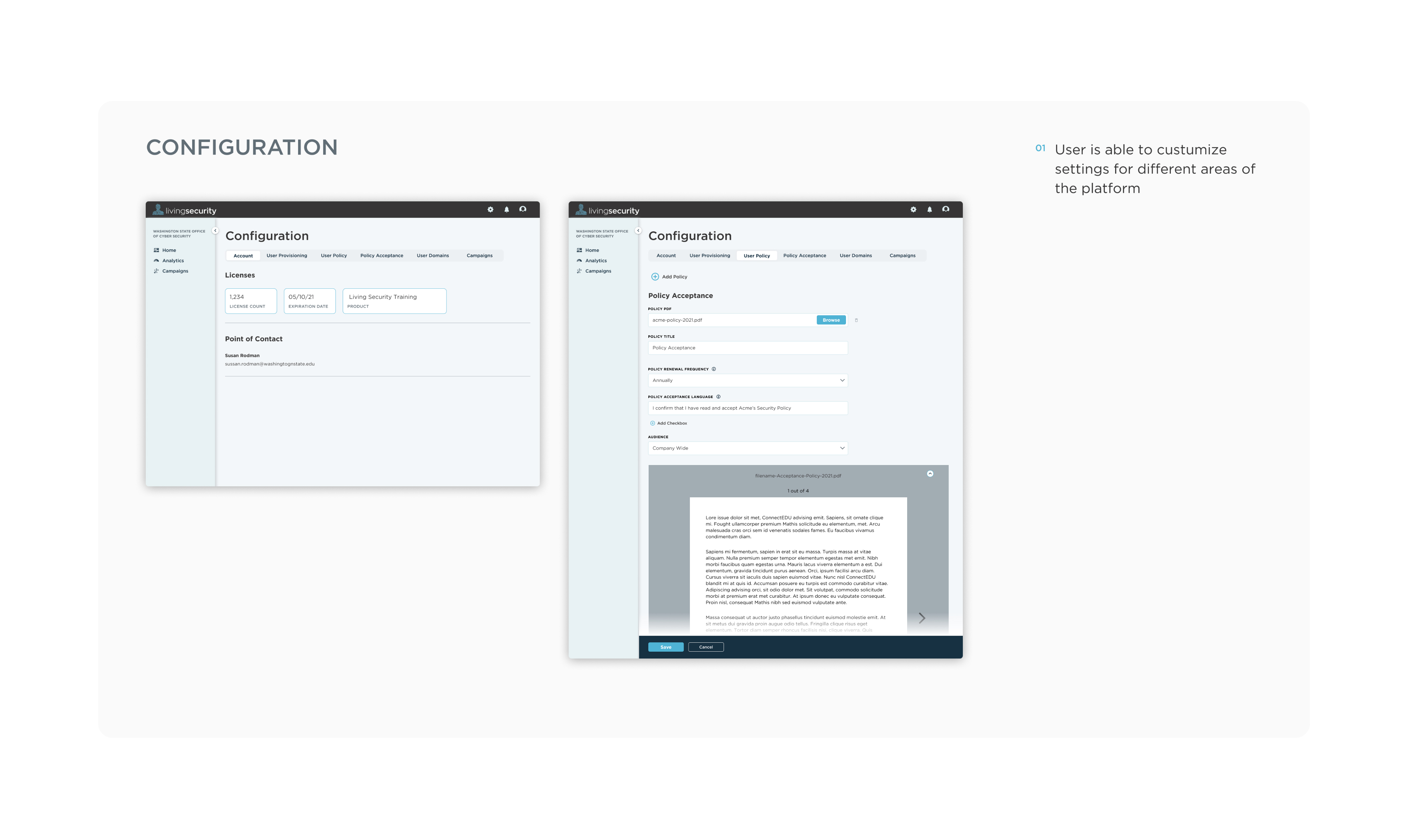
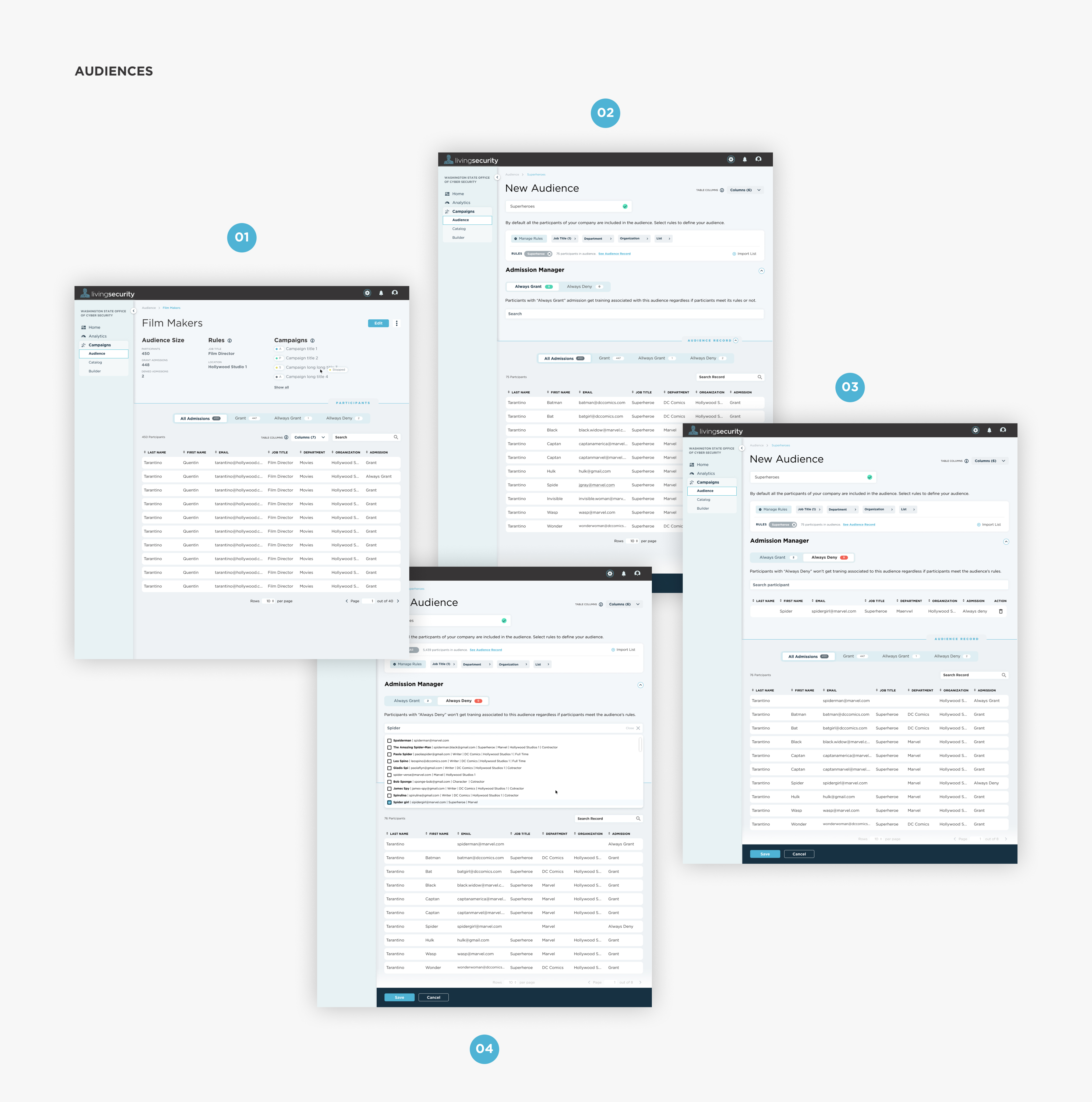
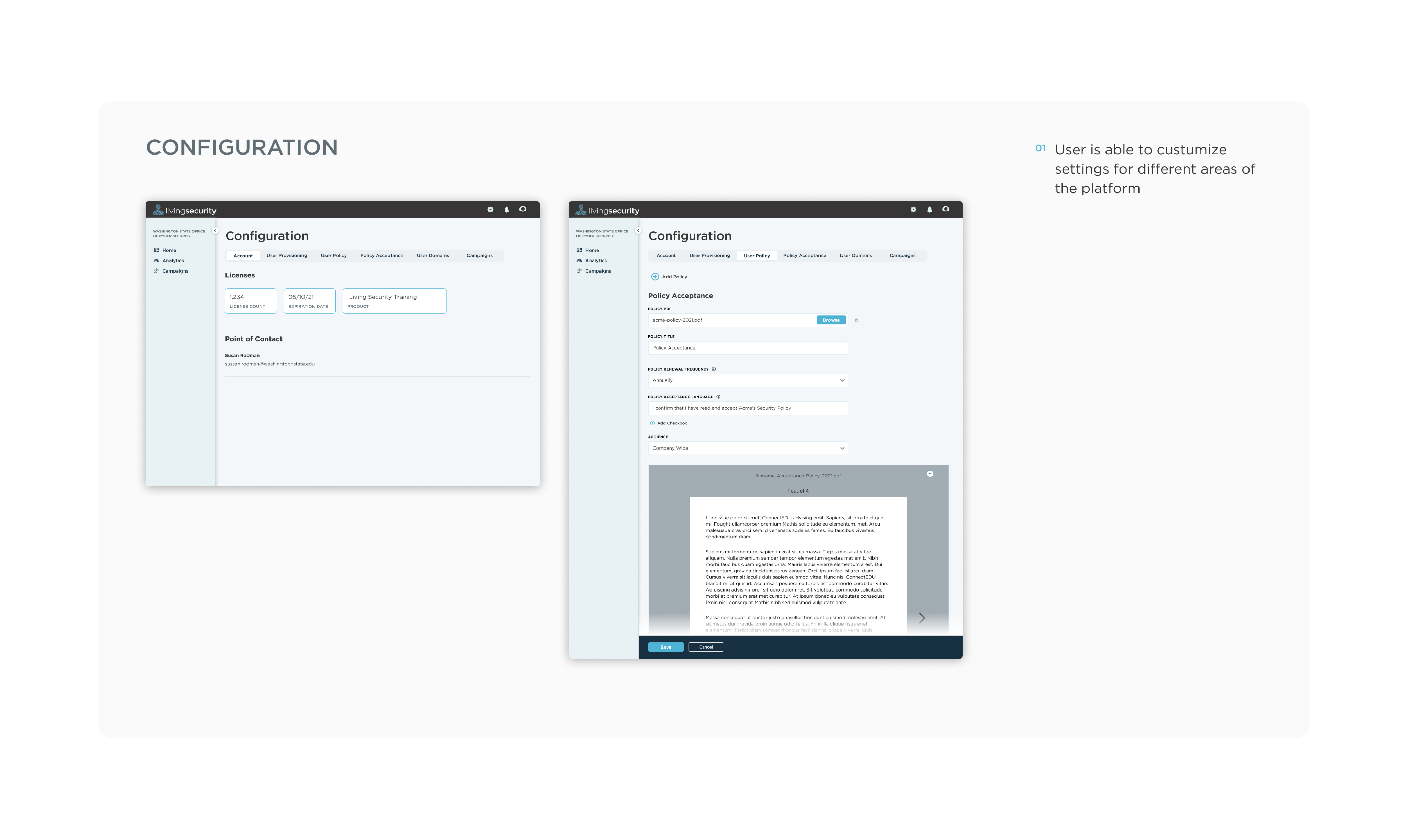
Configuration screen
Configuration screen variant
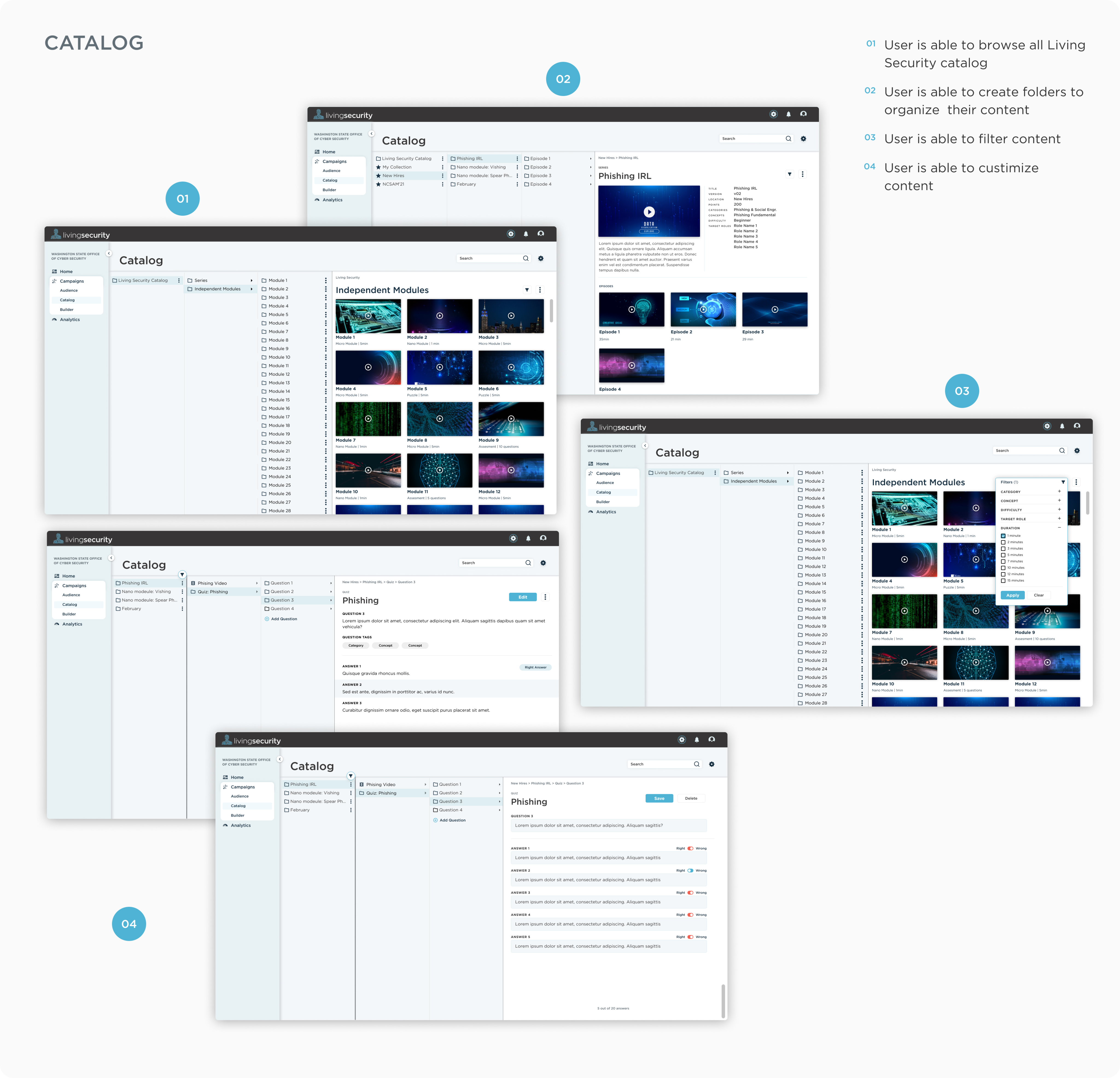
Catalog screen
Configuration screen 2
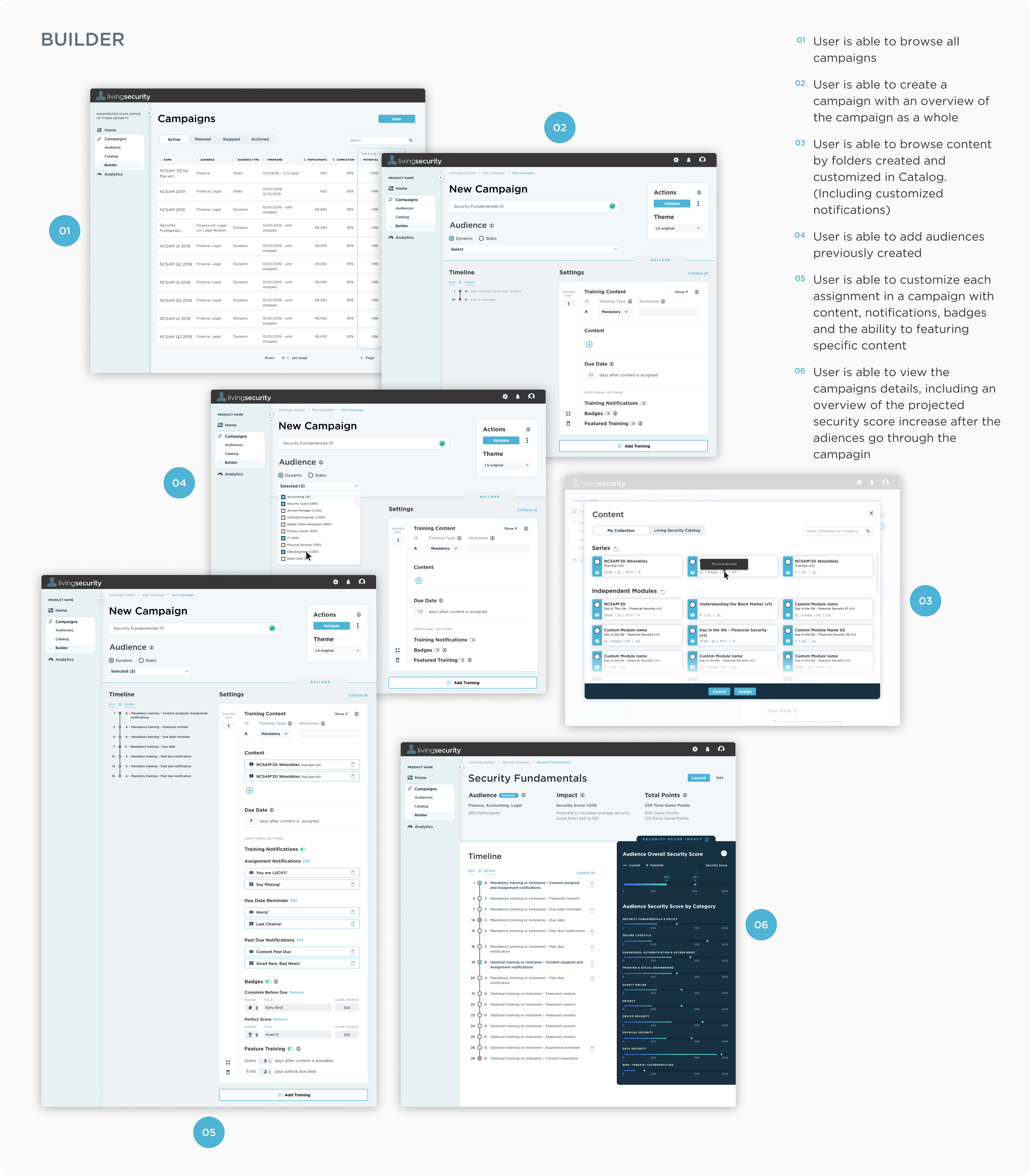
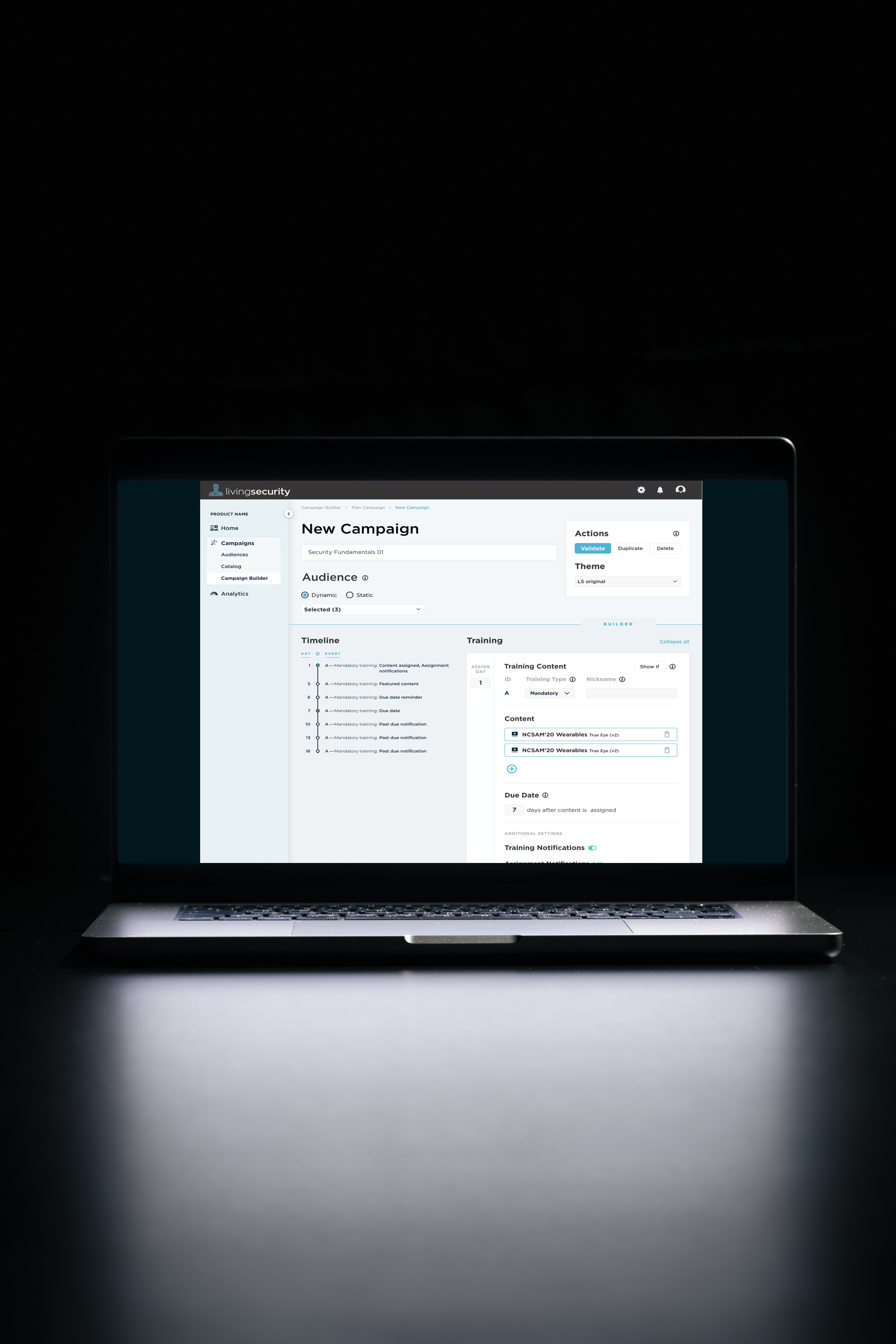
Campaign builder screen
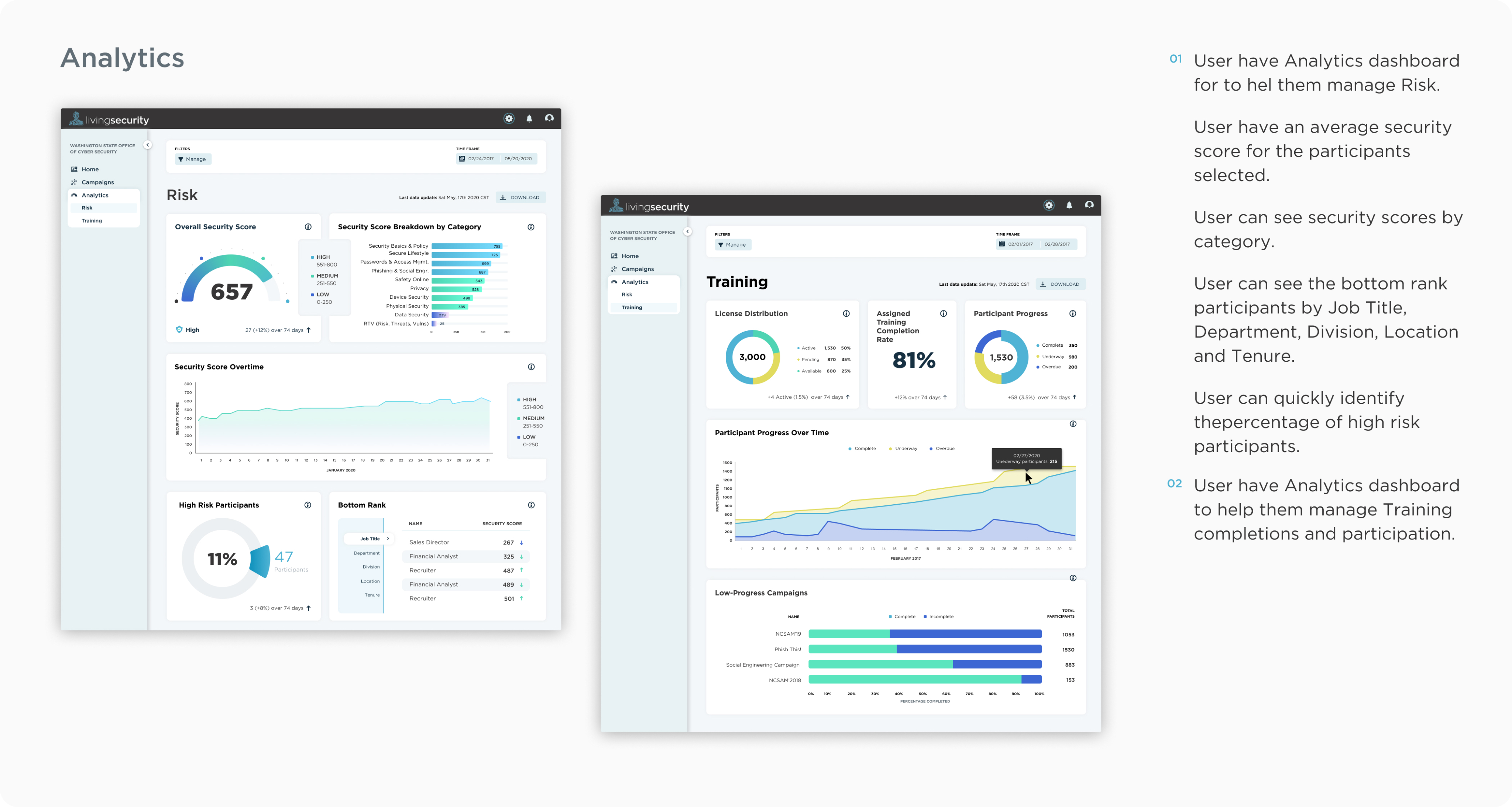
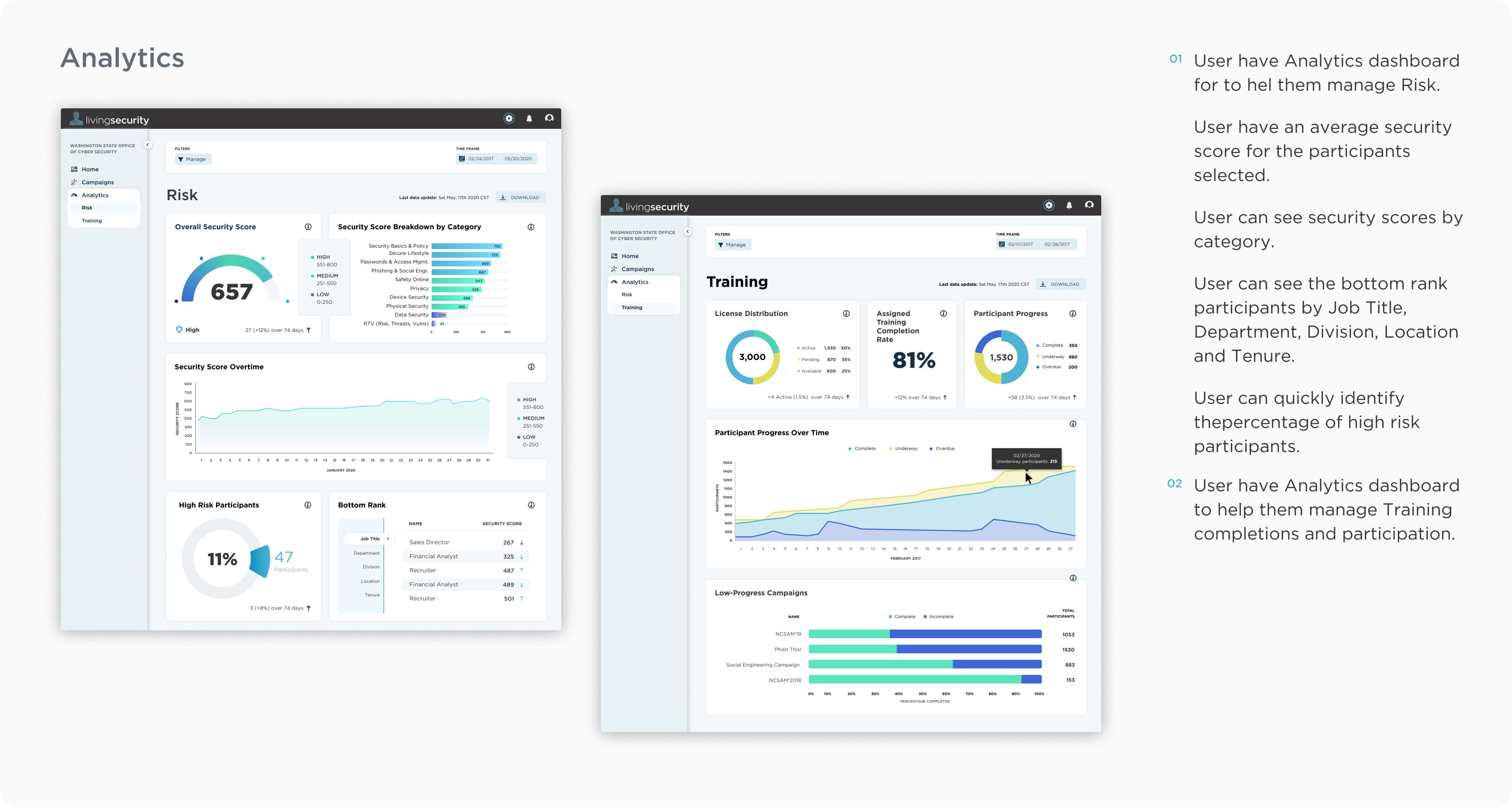
Analytics screen

THE PROBLEM

LS Admins had to manually create campaigns for every client. One by one.

Living Security's cybersecurity training platform had a critical bottleneck: Program Owners couldn't build or manage their own training campaigns. Every campaign had to be created manually by LS Admins on behalf of each client — a slow, labor-intensive, and impossible to scale process. The goal was to put that power directly in the hands of the Program Owner through a self-serve, customizable platform.

$1M
Annual revenue in 2019 before the platform redesign
$1M
Per single deal by 2021
3
User types served: End User, Program Owner, LS Admin
5
Core platform modules: Audiences, Catalog, Campaign Builder, Analytics, Dashboard

THE SITUATION

A manual process wearing the costume of a platform.

The Problem
LS Admins manually created cybersecurity training campaigns for each client. The process was slow, prone to errors, and impossible to scale as the business grew.
The Users
Three distinct user types with different needs: Program Owners who run the campaigns, End Users who take the training, and LS Admins who manage the platform backend.
The Opportunity
Build a self-serve platform where Program Owners can independently create audiences, curate content from a catalog, build campaigns, and view analytics — without LS Admin involvement.

WHO WE DESIGNED FOR

Three distinct users. One platform. Wildly different goals.

Mapping all three users forced early decisions about information architecture, permissions, and feature visibility. The platform had to serve each one without creating friction for the others.

PRIMARY

The Kitchen Sink

Risk Program Manager

"I just need to meet compliance. I don't care about how happy people are or how fun it is."

KEY NEEDS

  • Easy, budget-friendly solutions
  • Automation for repetitive tasks
  • Compliance reporting for leadership
  • Competent training budget

PAIN POINTS

  • Too many emergencies, not enough staff
  • Budget restrictions
  • Difficulty prioritizing soft goals over concrete deliverables

PRIMARY

The Advocate

Security Officer

"I need to find a platform that fulfills the cybersecurity curriculum while truly engaging my employees."

KEY NEEDS

  • Clear analytics and performance data
  • Content that actually engages learners
  • Easy-to-follow, streamlined program
  • Trust from leadership and employees

PAIN POINTS

  • Lack of time or resources to train employees
  • Difficulty measuring impact
  • Training awareness isn't prioritized by the business

SECONDARY

The Decision Maker

CISO

"The biggest risk to our organization is human behavior. However, we cannot budget extra training."

KEY NEEDS

  • ROI proof for the board
  • Data, metrics, reporting
  • Risk visibility
  • Software compliance evidence

PAIN POINTS

  • Communication of technical risk to a non-technical board
  • Budgetary constraints
  • Reports take too much of his already limited time

DESIGN PROCESS

From discovery to delivery, and back again.

As Lead UX Designer I owned every phase: collaborating tightly with the PM, Tech leads, and FE Developers to ensure every decision balanced desirability, feasibility, and a clean developer hand-off.

01
Discovery
Mapped the current manual process, identified the bottlenecks and key user types.
02
Wireframing
Sketched platform architecture and user flows for all three user types.
03
Iteration
Refined flows based on stakeholder feedback and technical feasibility reviews.
04
Testing
Conducted usability testing with Program Owners and validated navigation models.
05
Implementation
Paired with FE developers to ensure pixel-accurate, accessible hand-off.
06
New Features
Continued iterating post-launch with analytics dashboards, notification systems, and campaign builder enhancements.
Early platform wireframes — overview
Early platform wireframes — detail

PLATFORM ARCHITECTURE

Five modules. Three user types. One cohesive system.

The platform architecture defined what each user type could access — and what they couldn't. Mapping this early prevented scope creep and kept development focused.

Program Owner
Primary power user. Creates audiences, curates content, builds and launches campaigns, views analytics.
End User
Receives email notifications, plays through assigned training content, tracked for completion.
LS Admin
Backend platform management. Customer account creation, configuration, high-level oversight.

PLATFORM MODULES

Audiences
Define and manage who receives training. Supports Active Directory, CSV upload, and single user creation.
Catalog
Browse and curate cybersecurity training content by role, topic, or risk type.
Campaign Builder
Assemble content blocks, set due dates, configure dynamic rules, and schedule notifications.
Analytics
Track completion rates, identify lagging learners, and report performance to leadership.
Dashboard
Overview of all active campaigns, participation metrics, and program health.
Audiences module
Catalog module
Campaign Builder module
Analytics module
Configuration module

JOURNEY MAPPING

Mapping the Advocate's end-to-end journey revealed where the platform was failing her.

What we learned
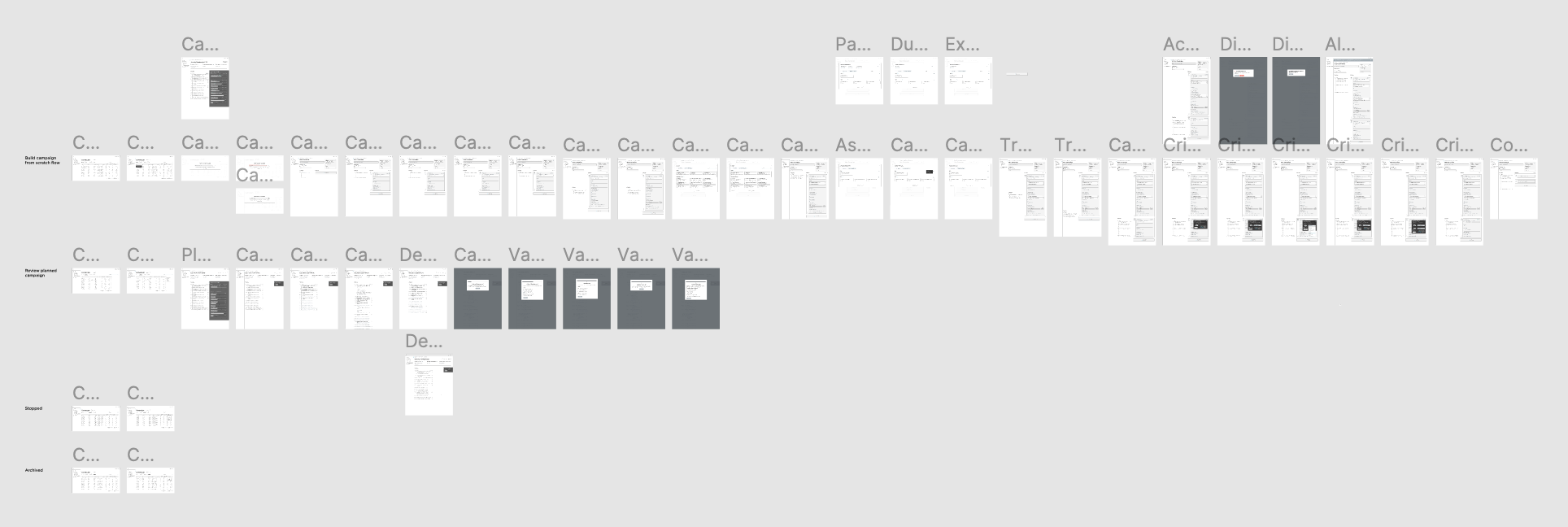
The journey map gave the full team a shared view of the end-to-end flow allowing us to quickly surface dependencies and identifying which actors were involved at each phase.
Gaps identified
The map revealed critical gaps between what Program Owners needed to do and what the platform allowed them to do independently. Manual steps were everywhere.
How we used it
Teams referenced the journey map as a living document throughout design and development. Future roadmap features were plotted directly on it, keeping the product strategy grounded in user reality.
The Advocate end-to-end journey map

KEY FEATURE DEEP DIVE

The Campaign Builder: the most complex feature, and the most important one.

The Campaign Builder was the core of the platform. It was the place where Program Owners assembled training assignments, set rules, configured notifications, and launched campaigns to audiences of thousands. Getting it right required a clear user story, a documented task flow, and multiple rounds of iteration.

USER STORY: THE ADVOCATE

Susan is a Business Information Security Officer managing 10,000+ employees. She needs to send targeted training campaigns to specific departments, track who completes them, send reminders to laggards, reward people who finish on time, and report progress to leadership every quarter — all without help from an LS Admin.

1
Create Audience
Define the Finance dept. group with dynamic membership rules
2
Curate Catalog
Filter content by role and risk type to find the right assignments
3
Build Campaign
Set dynamic mode, assign content blocks, configure due dates
4
Set Notifications
Assignment alerts, due-date reminders, past-due nudges every 3 days
5
Launch
Participants are assigned automatically when they join the department
Campaign Builder interface

IMPACT

The same number. A completely different business.

$1M in annual revenue in 2019. $1M in a single deal by 2021. The platform exponentially improved the product which changed what the business was capable of selling.

Revenue transformation
A self-serve enterprise platform unlocked deal sizes that simply weren't possible when every campaign required manual LS Admin setup. Design directly enabled the business model shift.
Admin burden eliminated
Program Owners could independently build, launch, and monitor campaigns at any scale. The LS Admin bottleneck was removed from the core user flow entirely.
Design system established
Spearheaded and maintained the Living Security design system, bringing visual consistency, faster iteration cycles, and a shared language between design and engineering.
End-to-end ownership
Mapped the e2e user journey across all stages of the product lifecycle, identifying gaps for every department — not just product, but also sales, support, and onboarding.

REFLECTION

Lead designer doesn't mean lone designer.

The most important thing I learned at Living Security was about how to work. Being the Lead UX Designer meant staying in constant contact with clients, PMs, and FE developers simultaneously. Desirability was only valuable if it survived the technical feasibility conversation. And a design system enables the business to make iteration fast enough to actually keep up with a startup moving at that pace.

KEY INSIGHT

When you design for self-service, you're designing a transfer of power from the provider to the customer.

The platform gave Program Owners something they didn't have before: autonomy over their own security training program. That shift — from waiting on an admin to just doing it yourself — is what changed the business.